Ground before planning
Specialists begin with the organisation’s relevant knowledge before deciding how to approach the work.
AlphaAgent OS is the proprietary operating system beneath real agentic work. We engineer and continuously advance the foundation, so your teams can focus on reinventing the business capability.
Inherited operating guarantees
AlphaAgent OS
Institutional knowledge becomes reusable intelligence.
Move proven assets between teams and deployments.
Agents compute, coordinate and work through approved systems.
Context persists. Improvements stay deliberate.
Decision rights and supervision remain in force.
Sources, computation and decisions remain inspectable.
Proprietary by design
A model and instructions are only the start. We built ten proprietary components to solve the hard operating problems around real agentic work. Your teams inherit the complete system and every advance we make to it.
Turn documents and relationships into reusable specialist intelligence.
Share versioned agents, workflows and graphs across your organisation.
Run real computation and durable agent work.
Govern complex processes without scripting away judgement.
Use live systems through approved, protected connections.
Carry useful context across cases, people and time.
Test alternatives and promote only what performs.
Place access, decisions and accountability with the right people.
Supervise agent behaviour while work is running.
Keep evidence, actions and decisions with every outcome.
We are reinventing the agentic operating system so you can reinvent the business capabilities that run on it.
Intelligence Graphs turn your methods, policies, research and institutional knowledge into reusable specialist expertise. Give an out-of-the-box agent a specialist skill: the knowledge of what to do, how to do it and which evidence to use.
An agent. A new skill.
The prompt sets the objective. The Intelligence Graph supplies the depth, so you do not have to teach the whole job inside every prompt.
Start with
A capable agent
Able to reason, use tools and carry work.
Add an Intelligence Graph
Your specialist skill
Methods, models, procedures and the evidence behind them.
Put to work
A specialist agent
Equipped to apply your expertise to the task.
Sets the role, objective and instructions for the task.
Makes relevant documents and information available to search.
Brings methods, relationships and source evidence together so an agent can apply a specialist skill. Build that expertise once and reuse it across authorised agents.
Specialist skills in action
A motor claim needs damage assessment, policy judgement and clear communication. Follow one agent as it draws on a different Intelligence Graph for each job, carrying the claim and its findings through to a case ready for review.
ONE CLAIM. ONE AGENT.
INSURANCE CLAIM
A collision at a junction.
The customer reports front-left damage. Photographs, a repair estimate and the motor policy accompany the claim.
Front-left collision. Retrieve the assessment method, hidden-damage checks and report requirements.
Damage assessed; concealed damage unconfirmed. Retrieve the coverage-review method and decision checks.
Inspection pending; coverage not approved. Retrieve guidance for a clear, accurate customer update.
The intelligence engine
Intelligence Graphs are powered by AlphaAgent’s proprietary Augmented Multi-Resolution Property Graph (AMPG) mechanism, which organises knowledge and retrieves it in context. Three stages turn source material into expertise an agent can use.
01 / Embedding
Add policies, procedures, research and model documentation. AlphaAgent automatically turns them into structured, contextual Intelligence Graphs, with the whole document and its detail held together.
02 / Indexing
Concepts, relationships and overlaps are mapped at multiple levels of detail. New documents and domains can be added without designing and maintaining a rigid knowledge model for each one.
03 / Retrieval
For each task, the system finds relevant knowledge and follows the relationships that reveal the evidence that matters. Agents receive specialist context with a traceable path back to its source.
Specialists begin with the organisation’s relevant knowledge before deciding how to approach the work.
Retrieval follows an explicit budget, keeping exploration controlled and repeatable.
The Thought Map records the path from the question to the source. Retrieval supplies evidence, not an authored conclusion.
A volatility analyst draws on model documentation, research and house methods to assess a signal in its market context.
A claims investigator draws on policy wording, procedures and exceptions to assess a case against the relevant source clauses.
Build the expertise once. Give every authorised agent the skill to apply it.
Reusable expertise
AlphaAgent ships with a growing set of Intelligence Graphs for high-value financial services use cases across capital markets, insurance, banking and payments.
Teams can build Intelligence Graphs from their own policies, procedures, research, model documentation, operating guidance and specialist methods.
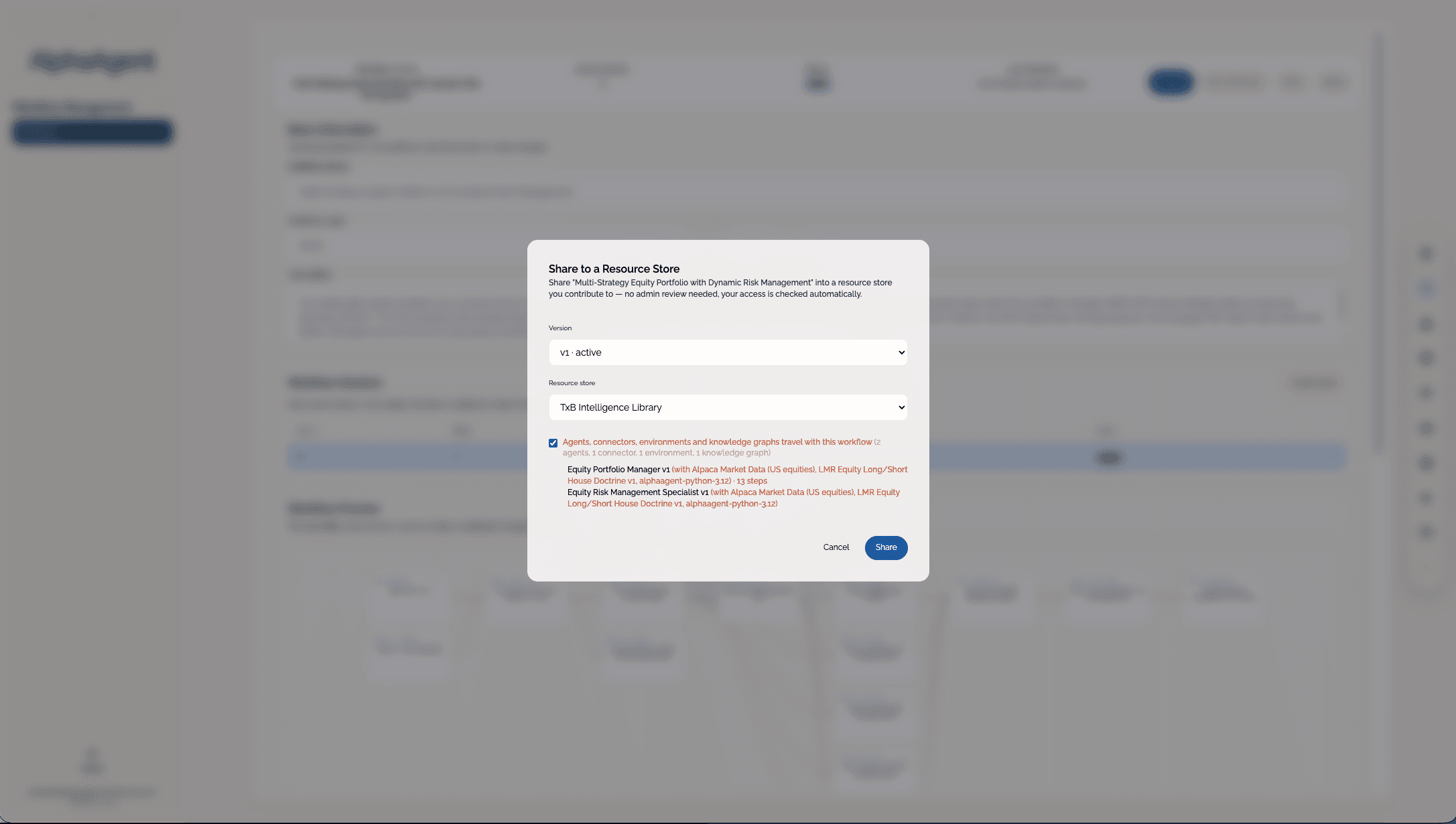
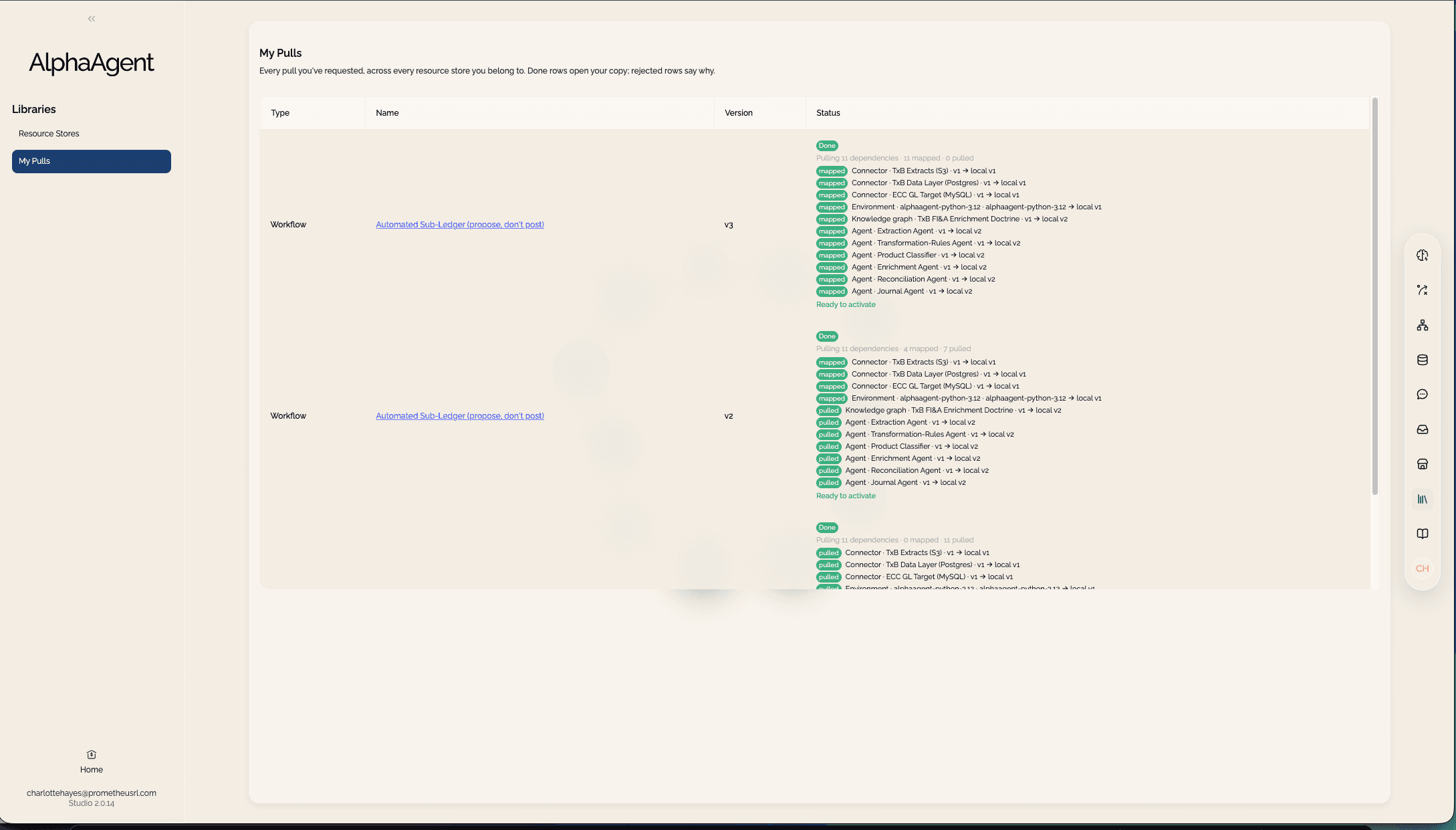
Share a selected Intelligence Graph version to an organisation library. Authorised teams can pull a copy into their own Studio deployment.
Build an Intelligence Graph in Studio, share a selected version through the Organisation Library, and make that expertise available to authorised teams. Their local copies remain under their own deployment’s control.
Use cases
Quant researchers, volatility specialists, FX analysts, portfolio researchers and credit analysts need more than general language understanding. They need embedded knowledge, technical methods, mathematical context and the ability to apply them correctly.
Specialist domain knowledge
Mathematical and model context
Research workflows
Expert reasoning paths
KYC analysts, fraud investigators, compliance reviewers, claims handlers and underwriters need to navigate huge volumes of policy, regulation, procedure and exceptions.
Policy and regulation knowledge
Procedure and control mapping
Source-grounded decisions
Traceable escalation logic
Create in Studio, then share a chosen version through the Organisation Library. Teams across your organisation can pull proven agents, workflows, Intelligence Graphs and other assets into their own deployments.
Shared assets
Move useful work from one Studio to teams across the enterprise.
Expertise and working patterns can spread without forcing every team to rebuild them.
Agents compute against real data, coordinate adaptive work and use approved systems. Substantial runs continue without step-by-step supervision.
Runtime execution
Execute the work.
The output comes from work that actually ran, not text that merely sounds calculated.
Governed orchestration
Keep judgement intact.
The process becomes repeatable without flattening the judgement inside it.
Approved connection
Reach approved systems.
Agents reach the systems they need without being given unrestricted access.
One request, coordinated expertise
Complex work draws on several disciplines. A supervisor brings the right specialists together, coordinates their tasks and combines their findings into one evidenced result.
Your people set the objective and review the outcome. The team carries the investigation between them.
“What is driving this volatility?”
Match control to the work
Decide what agents can choose as they work and what the process must determine in advance. Both approaches operate within defined authority and retain evidence of what happened.
Dynamic teams
A supervisor selects specialists as the work unfolds. New evidence can change the next task, the tools used and the expertise needed.
A research desk brings together macro, volatility and risk expertise as an investment question develops.
Governed workflows
Set the sequence, decision points and approvals in advance. Specialists still apply judgement within each step, while the process stays controlled.
A claims operation coordinates damage assessment, policy review and customer communication, with approval where required.
Chat becomes workflow
Explore the work in Studio first. When the approach proves useful, capture it as a governed workflow, reusing the specialist intelligence and connections already in place.
01
Work through a question in chat with specialist agents.
02
Define the proven tasks, handoffs and decision points.
03
Add approvals, exceptions and evidence requirements.
04
Trigger the workflow on a schedule, an event or by API.
The process can run without someone prompting each step. People retain the decisions that matter.
Memory and Academy make continuity and controlled improvement part of the operating system. Useful context survives the exchange. Better-performing approaches are tested, versioned and promoted without silently changing live work.
Persistent context
Context survives the moment.
Memory becomes part of the working environment, not a transcript that must be reread.
Controlled improvement
Improvement stays controlled.
The system improves without silently rewriting how live work operates.
Authority and Governor solve different control problems. Authority keeps access and decisions with people. Governor supervises agent behaviour while work runs. Together they let agents carry more responsibility without weakening accountability.
Human decision rights
People keep decision rights.
Agents carry the work without inheriting authority that belongs to people.
Runtime supervision
Keep work on course.
Supervision supports the work without replacing the person accountable for it.
Governed connections
A connection carries instructions as well as access. Agents need to understand what a source means, how to use it and where their permission ends.
Bridge connects the systems. Authority defines access and decision rights. Governor supervises the work that uses them.
Illustrative access and usage rules
Control during execution
Agents can investigate and prepare a recommendation without gaining permission to carry out every action they propose. Access, supervision and approval work together throughout the run.
01
Define who can use the capability, what it may access and which decisions need approval.
02
Governor reviews progress against the objective and grounded facts, requesting correction or clarification when needed.
03
The authorised person reviews material decisions. Guidance, interventions and approvals remain with the work.
Assess a mandate breach.
Read approved positions and limits. Investigate the exposure and prepare a recommendation.
Changing the portfolio requires approval.
The proposed action goes to an authorised person. Permission to investigate does not grant permission to execute a trade.
The work moves forward. Accountability stays clear.
Lens keeps the evidence, guidance and human decisions together so the outcome can be inspected afterwards.
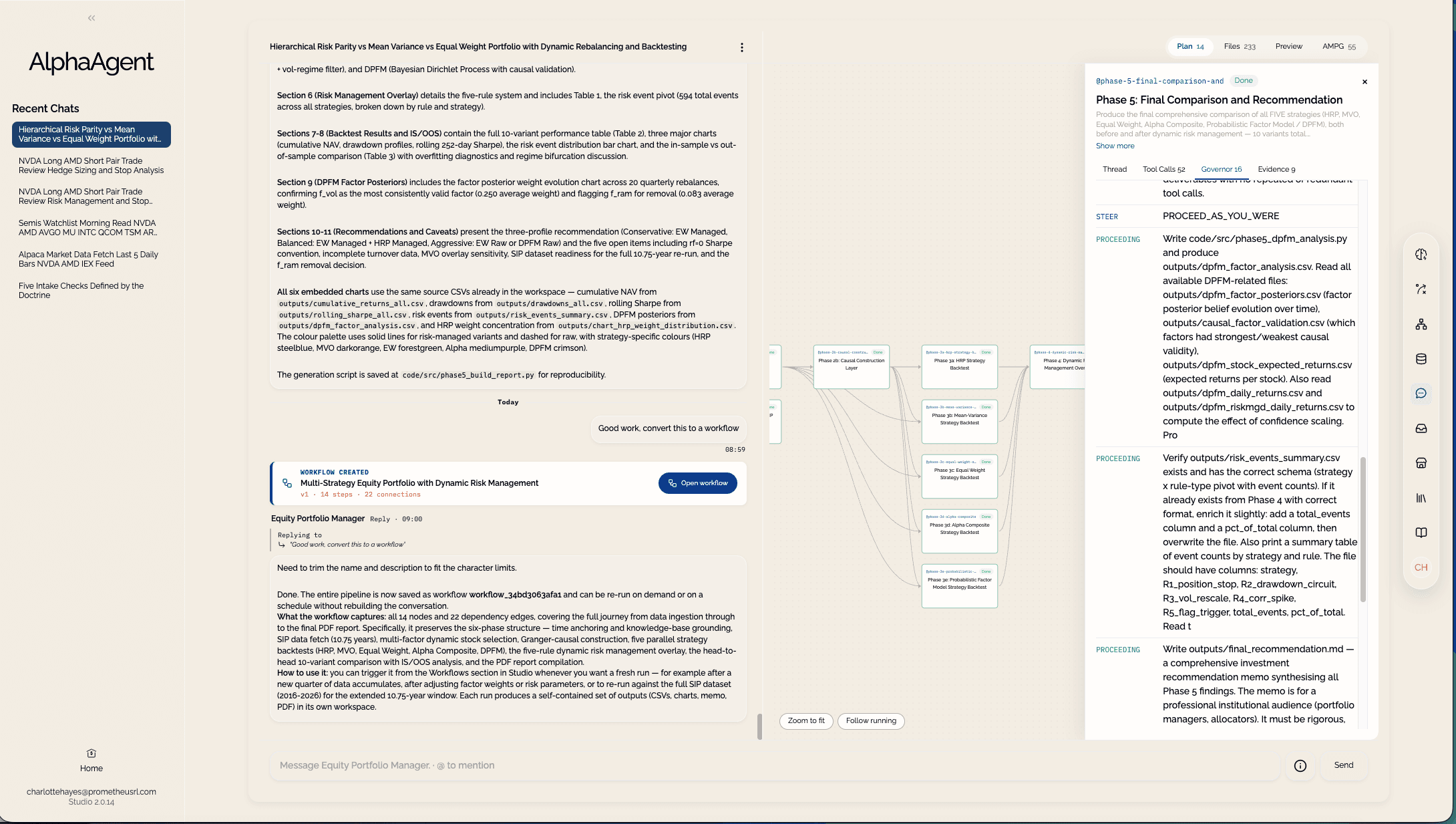
Lens builds the audit record as work happens. It keeps configuration, evidence, computation and material decisions together, so people can inspect and defend the outcome without reconstructing it afterwards.
Evidence and evaluation
Keep the record with the work.
Teams can inspect, replay and defend how an outcome was reached.
From request to record
A defensible answer needs a visible path behind it: what the agent was asked, which data it used, what it executed and which controls shaped the result.
Lens retains that path as the run progresses, from the first request through the evidence and decisions kept with the outcome.
Traceability
Inspect the code that ran, the tools called and the data consumed. See how records were joined and which evidence supported the response, alongside the guidance and approvals that affected it.
Illustrative record · retained inside your boundary
Evidence in use
Use the record to understand performance, assess quality and account for material decisions.
Observe
Follow agent activity, tool calls, data use and computation. See the outputs, timings and errors behind the result.
Traces · Logs · Metrics · Code outputs
Evaluate
Assess agent behaviour and output quality against defined criteria. Compare results and identify regressions before and after deployment.
Test suites · Quality scoring · Human review
Audit
Review the sources, resource versions, workflow path and approvals together. Trace the result back to the work that produced it.
Provenance · Replay · Data lineage · Approvals
Your deployment
AlphaAgent OS runs inside your AWS account. The operating foundation, specialist intelligence and customer work remain within your cloud environment.
Customer-controlled boundary
The operating boundary remains your boundary.
Intelligence, orchestration, memory, authority, governance and evidence working as one system.
Runs with
Agents, conversations, Intelligence Graphs, workspaces, datasets and runtime services remain in customer-controlled AWS accounts, not a shared vendor backend.
Inference runs through Amazon Bedrock in the selected US or EU zone. There is no direct third-party model API or global fallback.
Secrets remain in AWS Secrets Manager and are resolved only when authorised work invokes the relevant connection, so access is not broadly exposed to the agent system.
Only signed licence heartbeats and usage counts reach Console. Prompts, documents, results, definitions and credentials do not.
Start with one capability
Bring us a piece of work that matters. We will map the specialist intelligence, execution, connections, continuity, authority and evidence required to run it properly.